What is Maven?
Maven is a build automation tool developed using the Java programming language. It is primarily used for Java-based projects to manage the build process, including source code compilation, testing, packaging, and more. Maven utilizes the Project Object Model (POM), where the pom.xml file describes the project's configuration and dependency management.
Features of Maven
The Maven Build Automation tool provides a lot of features to make the development easy. Below we listed them:
• Dependency Management:
Automatically downloads and manages external libraries.
• Standard Project Structure:
Follows a fixed folder layout for source, test, and other files.
• Build Lifecycle:
Defines standard build phases like compile, test, and deploy.
• Plugins:
Supports plugins for compiling, testing, packaging, and more.
• POM File:
Uses pom.xml to manage configuration and dependencies.
• Central Repository:
Fetches dependencies from a shared online repository.
• Build Profiles:
Supports different settings for dev, QA, and production.
• Reporting:
Can generate Javadoc, test reports, and project documentation.
• IDE Support:
Integrates with Eclipse, IntelliJ, NetBeans, etc.
Maven Project Structure
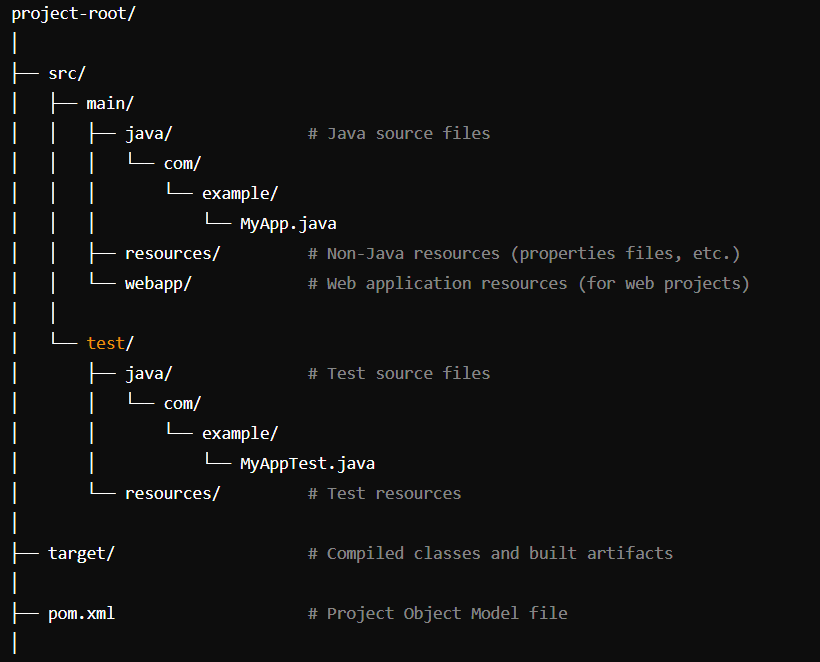
Directory structure
Maven provides a standard Project folder structure you can observe this in the above image.
• src/main/java:
It contains the main Java source code.
• src/main/resources:
It contains non-Java resources used by the application.
• src/main/webapp:
It contains resources for web applications.
• src/test/java:
It contains test source code.
• src/test/resources:
It contains resources used for testing.
• target:
It contains compiled classes, packaged JARs/WARs, and other built artifacts.
• pom.xml:
The Project Object Model file that defines the project configuration, dependencies, and build settings.