Variables and Data Types in Java
A beginner-friendly guide to Java variables, data types, and how to share values safely between threads.
Part 1
Variables
A variable is a named place in memory that stores a value.
What is a variable?
In Java, every variable has a type, a name, and often a value. The type tells Java what kind of data it can store.
int age = 25;
String city = "Sydney";
boolean isActive = true;
Once you give a variable a type, you cannot put the wrong kind of data into it. For example, you cannot store text in an int.
Types of variables
Local
Inside a method. Lives only while the method runs. Must be given a value before use.
Instance
Inside a class, but outside methods. Each object has its own copy.
Static
Shared by all objects of the class. One copy for the whole class.
Final
Cannot be changed after it is set. Useful for constants.
ThreadLocal
Each thread gets its own private copy. Threads do not share this value.
Part 2
Data Types
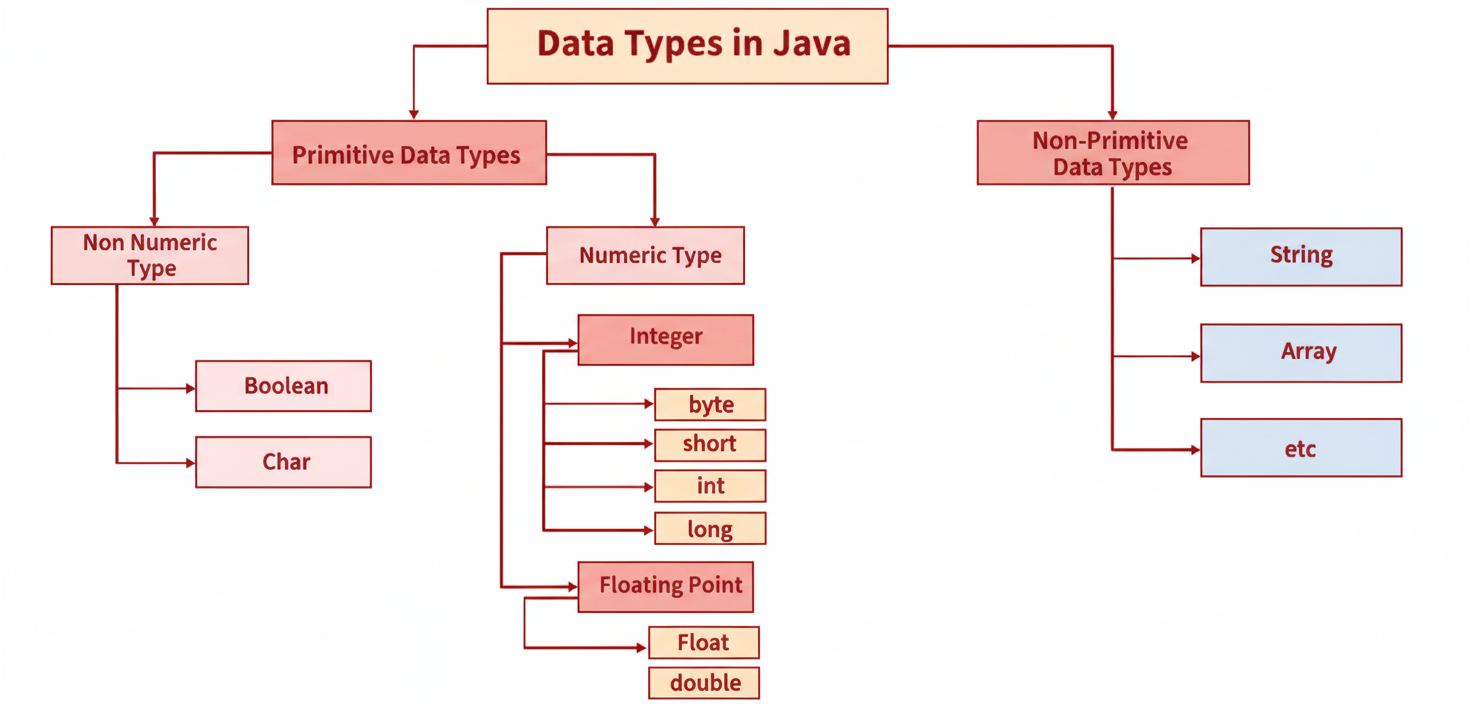
Data types tell Java what kind of value a variable can hold.
Two main groups
Primitive
Stores the real value directly. Examples: int, boolean, double.
Non-primitive (Reference)
Stores an address that points to an object. Examples: String, arrays, custom classes.
How values are stored in memory
Primitive
int x = 10;xstores the number10directly- No object is created
Non-primitive
String name = new String("John");namestores a reference (address)- The text
"John"lives on the heap
The 8 primitive types
Java has eight primitive data types. They are the basic building blocks for other types.
| Type | Meaning | Size | Example |
|---|---|---|---|
| boolean | true / false | JVM dependent | true |
| byte | Small whole number | 1 byte | 10 |
| short | Medium whole number | 2 bytes | 2000 |
| int | Common whole number | 4 bytes | 1000 |
| long | Large whole number | 8 bytes | 123L |
| float | Decimal number | 4 bytes | 3.14f |
| double | Precise decimal | 8 bytes | 3.14159 |
| char | Single character | 2 bytes | 'A' |
Non-primitive (reference) types
- String — text
- Arrays — list of values
- Wrapper classes — Integer, Double, Boolean
- Custom classes — classes you create
String title = "Java Guide";
int[] scores = {90, 85, 78};
Integer count = Integer.valueOf(42);
Part 3
Shared Variables (Threads)
When many threads use the same variable, you need special tools so the values stay correct.
The problem with a normal variable
Two threads may update the same number at the same time. This can give the wrong result.
int count = 0;

// Thread A and Thread B both do:
count++;   // NOT safe

// count++ is really 3 steps:
// 1. read count
// 2. add 1
// 3. write count back
If both threads read 0 at the same time, both may write 1. One update is lost. This is called a race condition.
Atomic variables
An atomic variable updates a value in one complete step. No other thread can interrupt in the middle. They live in java.util.concurrent.atomic.
Common atomic classes
| Class | Holds | Use for |
|---|---|---|
| AtomicInteger | int | Counters, IDs |
| AtomicLong | long | Large counters |
| AtomicBoolean | boolean | Flags, start/stop |
| AtomicReference | Object | Shared object swap |
AtomicInteger example
import java.util.concurrent.atomic.AtomicInteger;

AtomicInteger visits = new AtomicInteger(0);

visits.incrementAndGet();  // safe ++
int total = visits.get();  // read value
Useful methods
get()— read the valueset(value)— set a new valueincrementAndGet()— add 1 safelycompareAndSet(old, new)— change only if value is still old
AtomicBoolean example
AtomicBoolean started = new AtomicBoolean(false);

// Only the first thread starts the service
if (started.compareAndSet(false, true)) {
    System.out.println("Starting...");
}
How CAS works (simple)
CAS means Compare And Swap. Before updating, it checks the value:
- Look at the current value
- Decide the new value
- Update only if nobody else changed it
- If someone else changed it, try again
Example: value is 5, thread wants 6. CAS says: "If it is still 5, change it to 6." If another thread already made it 7, skip and try again.
The volatile keyword
volatile means: when one thread changes this variable, other threads see the new value quickly.
volatile boolean running = true;

// One thread
running = false;

// Other threads see running == false soon
What it does
- Shares the latest value
- Good for stop flags
What it does NOT do
- Does not make
count++safe - Does not replace AtomicInteger
Which one should you use?
Use the tool that matches your problem:
volatile — show the latest value
One thread writes. Other threads only read.
volatile boolean running = true;Best for: stop flags, on/off switches
Atomic — safe update for one value
Many threads change the same number.
visits.incrementAndGet();Best for: counters, IDs
synchronized — only one thread at a time
Several steps must stay together.
synchronized void transfer(...) {
    from.balance -= amount;
    to.balance += amount;
}
Best for: money transfer, updating many fields together
| Tool | Simple meaning | Example |
|---|---|---|
| volatile | Share the latest value | Stop flag |
| Atomic | Safely change one value | Visit counter |
| synchronized | One thread runs a group of steps | Money transfer |
Quick rule: use volatile for a flag, use atomic for one shared number, use synchronized when many related changes must happen together.
Part 4
ThreadLocal Variables
ThreadLocal gives each thread its own private copy of a value.
What is ThreadLocal?
A normal shared variable is seen by all threads. A ThreadLocal variable is different: each thread has its own separate value. One thread cannot see or change another thread's ThreadLocal value.
Simple picture
Think of a locker room. Every person (thread) has their own locker (ThreadLocal value). They use the same locker room name, but each locker holds different things.
How to use ThreadLocal
ThreadLocal<String> userName = new ThreadLocal<>();

// Thread A
userName.set("Alice");
System.out.println(userName.get()); // Alice

// Thread B (different thread)
userName.set("Bob");
System.out.println(userName.get()); // Bob

// Alice's value is still Alice in Thread A
// Bob's value is still Bob in Thread Bset(value)— store a value for the current threadget()— read this thread's valueremove()— delete this thread's value
ThreadLocal vs shared variables
Shared variable
- All threads see the same value
- Needs sync / atomic / volatile when updated
- Example: visit counter
ThreadLocal
- Each thread has its own value
- No need to synchronize that value
- Example: current user, request id
When to use ThreadLocal
- Store data that belongs to one request/thread only
- Keep a user id or transaction id for the current thread
- Avoid passing the same value through many method calls
class UserContext {
    private static final ThreadLocal<String> CURRENT_USER =
            new ThreadLocal<>();

    static void setUser(String name) {
        CURRENT_USER.set(name);
    }

    static String getUser() {
        return CURRENT_USER.get();
    }

    static void clear() {
        CURRENT_USER.remove(); // important!
    }
}
Important: always call remove() when the work is finished (especially with thread pools). If you forget, an old value may stay and leak into the next task that reuses the same thread.
Part 5
FAQ
Is AtomicInteger a primitive type?▼
No. It is a class that holds an int and updates it safely. The 8 primitives are still byte, short, int, long, float, double, char, and boolean.
Can atomic variables replace synchronized?▼
Only for simple one-value updates. If you must change several fields together, use synchronized.
Is volatile enough instead of AtomicInteger?▼
No. volatile only helps other threads see the latest value. It does not make count++ safe.
What is a ThreadLocal variable?▼
ThreadLocal gives each thread its own private copy of a value. Other threads cannot see it. Always call remove() when finished, especially with thread pools.
Are atomic variables slower?▼
A little slower than a plain int with one thread. With many threads, they are often safer and cleaner for counters.