
Multithreading in Java
Execute multiple tasks simultaneously and utilize CPU efficiently
What is Multithreading?
A thread is a single unit that can execute a program independently. Java allows multithreading to run multiple Java programs simultaneously, allowing tasks to execute in parallel and utilize the CPU more efficiently.
A thread in Java can exist in any one of the following states at any given time. A thread lies only in one of these states at any instant.
Thread Life Cycle
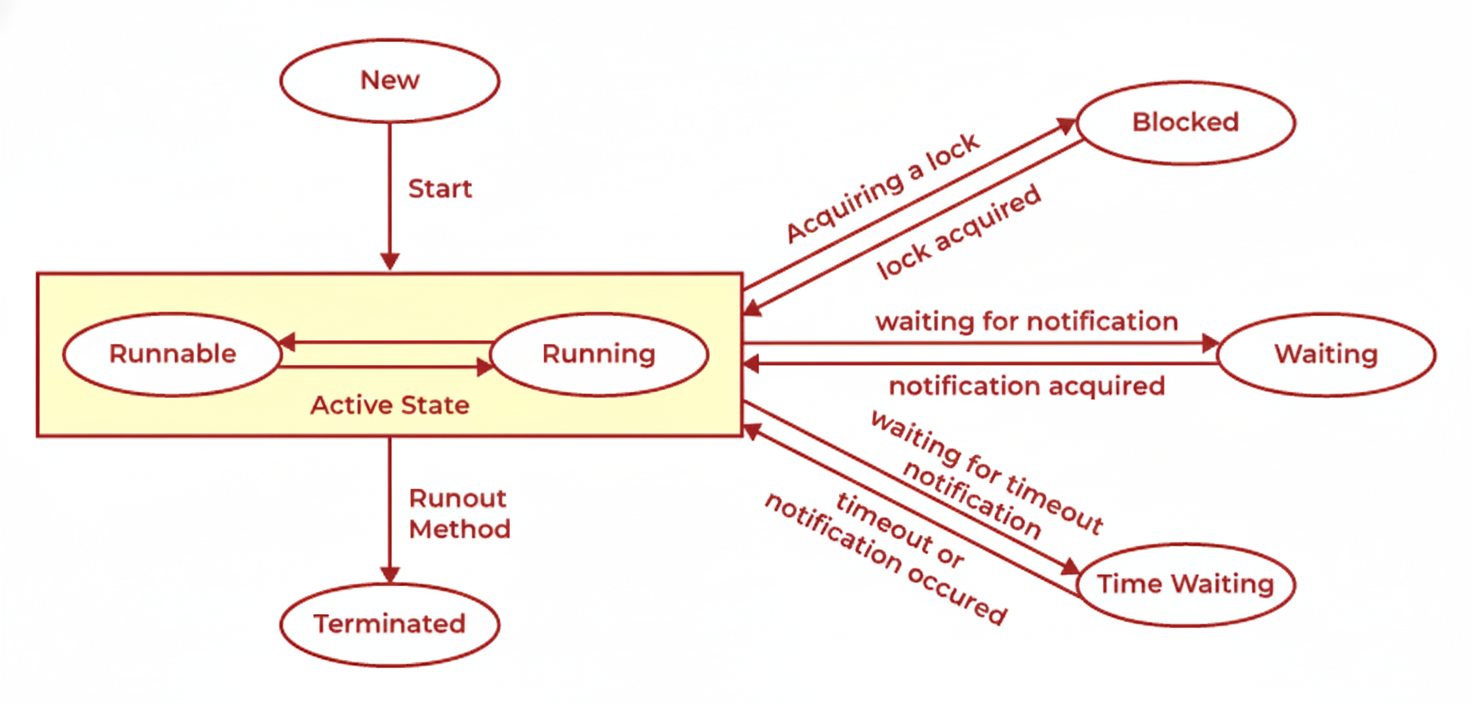
Thread States
A thread goes through several states during its lifetime
New
The thread is created but hasn't started running yet.
Runnable
The thread is ready to run or currently running. The CPU scheduler decides when it gets CPU time.
Running
Thread is running
Blocked
A thread is blocked when it needs something (a lock) that another thread is already using. It just waits. When the other thread is done and releases the lock, the waiting thread can run again.
Waiting
The thread waits with no set time limit for another thread to do something. It can run again only when it gets a signal or when the other thread is done.
Timed Waiting
The thread is waiting for a specific amount of time (e.g., using sleep() or wait(timeout)). It goes back to runnable after the time ends or when notified.
Terminated
The thread has finished running—either because it completed normally or because an error caused it to stop.
Different Ways to Create Threads
Two primary approaches to implement threading in Java
Extending the Thread Class
// Step 1: Create a class that extends Thread
class MyThread extends Thread {

    // Step 2: Write the code you want the thread to run inside run()
    public void run() {
        System.out.println("This is my thread running!");
        for (int i = 1; i <= 5; i++) {
            System.out.println("Count: " + i);
        }
    }
}

// Step 3: Create an object of your thread class and start it
public class Main {
    public static void main(String[] args) {
        MyThread thread = new MyThread();  // create thread
        thread.start();                    // start thread
    }
}
How it works:
- 1You create a class that extends Thread.
- 2You put the thread's work inside the run() method.
- 3You create an object of that class and call start(), not run().
- 4start() tells Java to run your run() method on a separate thread.
Implementing the Runnable Interface
// Step 1: Create a class that implements Runnable
class MyRunnable implements Runnable {

    // Step 2: Write the code you want the thread to run inside run()
    public void run() {
        System.out.println("This is my runnable thread running!");
        for (int i = 1; i <= 5; i++) {
            System.out.println("Count: " + i);
        }
    }
}

// Step 3: Create a Thread object and pass your Runnable to it
public class Main {
    public static void main(String[] args) {
        MyRunnable myRunnable = new MyRunnable();  // create runnable object
        Thread thread = new Thread(myRunnable);     // wrap it in a Thread
        thread.start();                             // start the thread
    }
}
How it works:
- 1You create a class that implements Runnable.
- 2You write your thread code inside run().
- 3You create a Thread object and give it your Runnable.
- 4You start the thread using start().
✅ Recommended: implements Runnable is the recommended way because Java doesn't allow multiple inheritance.
Important Thread Methods
| Method | Description |
|---|---|
| start() | starts execution in new thread |
| run() | thread code (DO NOT call manually) |
| sleep(ms) | pause thread |
| join() | wait for thread to finish |
| yield() | hint to scheduler |
| interrupt() | interrupts a thread |
Thread Synchronization
Control access to shared resources in multithreaded environments
What is Thread Synchronization?
Thread Synchronization means that only one thread can access a shared resource (like a code block) at a time.
When a thread enters the synchronized code, it gets a lock. After the thread finishes running that part of the code, it releases the lock, and then another thread can access the resource.
Synchronization can be achieved two ways:
1. Using synchronized method
synchronized void print() {
    System.out.println("Hello");
}
2. Using synchronized block
synchronized (this) {
    System.out.println("Safe execution");
}