Java Exception Handling
Master error handling and build robust applications
What is an Exception?
Exception is an unexpected problem that arises during execution of a programme. When an Exception occurs, the normal flow of the program is disrupted and the program/application terminates abnormally, which is not recommended. Therefore, these exceptions need to be handled.
Exception hierarchy
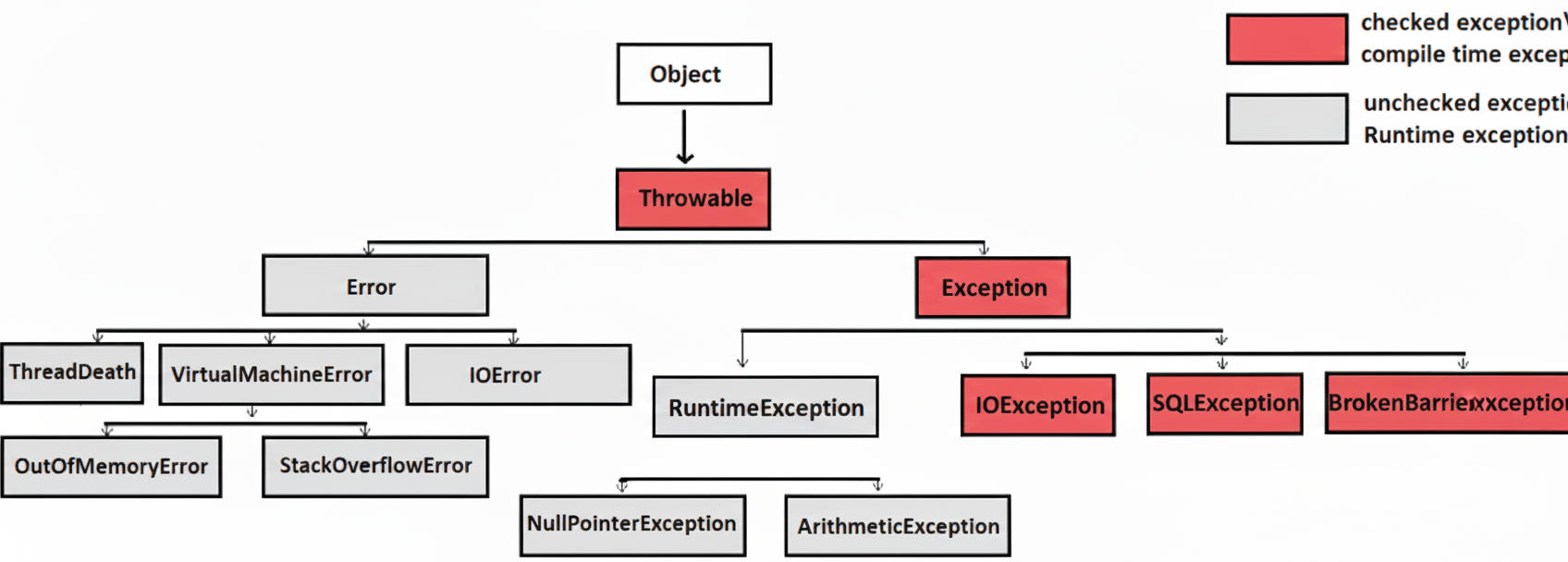
Throwable Class
Parent class of Exception and Error classes. Following is the list of important methods available in the Throwable class:
getMessage()
Returns a message that explains what exception happened.
getCause()
Returns the cause of the exception.
toString()
Returns the name of the class concatenated with the result of getMessage().
printStackTrace()
Prints the exception message and the list of method calls (stack trace) to the error output.
getStackTrace()
Returns an array of stack trace elements (Index 0 = most recent call, Last index = earliest call).
fillInStackTrace()
Updates the Throwable's stack trace with the current stack trace.
Java Exception Categories
Understanding the types of exceptions in Java
Checked Exceptions
The compiler checks whether these exceptions are handled (using try/catch or throws). If you don't handle a checked exception, the compiler gives an error. They are checked at compile time.
Unchecked Exceptions
The compiler does NOT check these exceptions. They occur during runtime (e.g., NullPointerException, ArithmeticException). You may handle them, but you are not required to. All errors and runtime exceptions are unchecked exceptions.
Exception Handling Methods
Four ways to handle exceptions in Java
Using Default Exception Handler
If an exception happens and you don't handle it using try/catch, Java sends it to the Default Exception Handler (built into the JVM).
What the Default Exception Handler Does:
- Stops the program (your code cannot continue)
- Prints the exception name (like NullPointerException)
- Prints the message
- Prints the stack trace showing where the error happened
public static void main(String[] args) {
    int x = 10 / 0;  // This causes ArithmeticException
}
Output:
at Main.main(Main.java:3)
Using try/catch
class CementMixer implements AutoCloseable {
    public void startMixer() {
        System.out.println("Mixer started...");
        throw new RuntimeException("Mixer overload!");
    }

    @Override
    public void close() {
        System.out.println("Mixer stopped and cleaned up.");
    }
}

public class BuildingDemo {
    public static void main(String[] args) {
        try (CementMixer mixer = new CementMixer()) {
            mixer.startMixer();
        } catch (RuntimeException e) {
            System.out.println("Problem occurred: " + e.getMessage());
        } finally {
            System.out.println("Construction site closing for the day.");
        }
    }
}
try block – "Do the risky work"
Contains code that might cause an exception. Like starting the cement mixer, which may overload.
Duty: Runs the risky operation and "tries" it safely.
catch block – "Handle the problem"
Runs only if an exception happens inside try. Like catching the mixer overload problem.
Duty: Receives the exception and handles it (prints message, takes action).
finally block – "Always do cleanup"
Runs whether there is an exception or not. Like cleaning the site after work is done.
Duty: Perform necessary cleanup (close tools, save data, release resources).
Auto-closable Object (try-with-resources)
The object (mixer) is automatically closed at the end of the try block.
- •Must implement AutoCloseable
- •Java automatically calls close() after the try block
- •It closes resources safely even if an exception happens
With auto closable object, no need to define finally block
With throws Keyword
throws is used in a method's declaration to say that the method might produce an exception, and the caller (parent method) must handle it.
void operateCrane() throws Exception {
    throw new Exception("Crane malfunction!");
}

public static void main(String[] args) {
    try {
        operateCrane();
    } catch (Exception e) {
        System.out.println("Manager handles: " + e.getMessage());
    }
}
This method says: "I might throw an exception — the caller must handle it."
Using throw Keyword
throw is used inside a method to manually create and throw an exception at a specific point.
void useDrill() {
    if (true) { // drill overheats
        throw new RuntimeException("Drill overheated!");
    }
}

public static void main(String[] args) {
    try {
        useDrill();
    } catch (RuntimeException e) {
        System.out.println("Supervisor handles: " + e.getMessage());
    }
}
Here the worker (method) directly throws the exception using throw. The caller must handle it with a try/catch block.