Control Flow Statements
Master the building blocks of programming logic
What are Control Flow Statements?
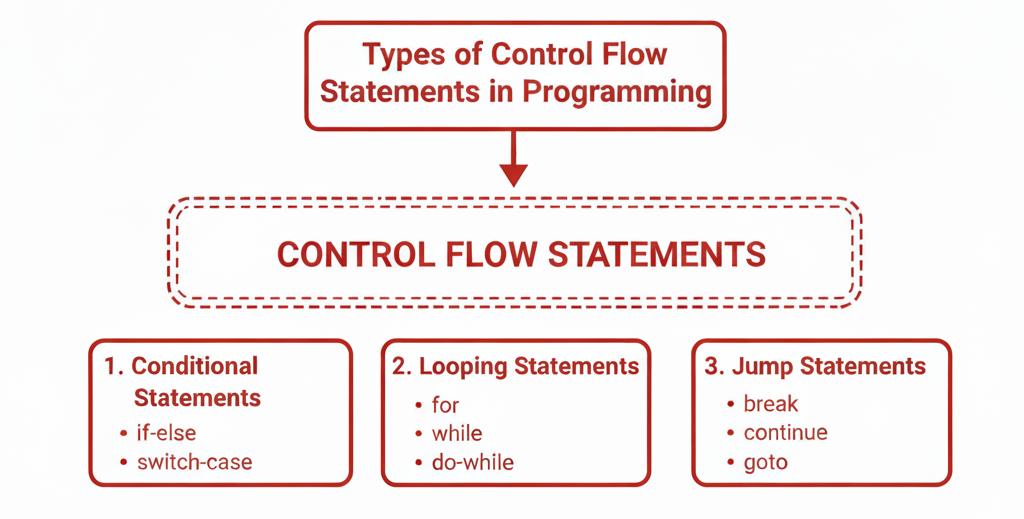
Control flow statements are fundamental components of programming languages that allow developers to control the order in which instructions are executed in a program. They enable execution of code based on conditions or repeatedly until a condition is met.
Conditional Statements in Programming
Make decisions and control program flow with conditions
Understanding Conditional Logic
Conditional statements allow a program to make decisions based on specific conditions. They determine which block of code should execute depending on whether a condition is true or false. Two of the most commonly used conditional structures are if-else and switch.
If Statement in Programming
public class IfElseExample {
    public static void main(String[] args) {

        int score = 85;

        if (score >= 90) {
            System.out.println("Grade: A");
        } else if (score >= 80) {
            System.out.println("Grade: B");
        } else if (score >= 70) {
            System.out.println("Grade: C");
        } else {
            System.out.println("Grade: D");
        }
    }
}
How it works:
- 1If score is 90 or above, print Grade: A.
- 2Otherwise, if score is 80–89, print Grade: B.
- 3Otherwise, if score is 70–79, print Grade: C.
- 4Otherwise, print Grade: D.
Switch Statement in Programming
public class SwitchCase {
    public static void main(String[] args) {

        String role = "admin";

        switch (role) {
            case "admin":
                System.out.println("Admin Access");
                break;
            case "user":
                System.out.println("User Access");
                break;
            case "guest":
                System.out.println("Guest Access");
                break;
            default:
                System.out.println("Unknown Role");
        }
    }
}
Step-by-step explanation
String role = "admin";
- •A variable named
roleis created. - •It stores the text
"admin".
switch (role)
- •Java compares the value of
rolewith each case.
case "admin":
- •If role is
"admin", print "Admin Access". - •
breakstops checking other cases.
case "user":
- •If role was
"user", print "User Access".
case "guest":
- •If role was
"guest", print "Guest Access".
default:
- •Runs only if none of the cases match.
- •Prints
"Unknown Role".
Looping Statements in Programming
Master iteration and repetition in your code
What are Looping Statements?
Looping statements, also known as iteration or repetition statements, are used in programming to repeatedly execute a block of code.
Here are simple and clear Java examples for:
Each example includes an explanation so it's easy to understand.
FOR LOOP
Code Example:
public class ForLoopExample {
    public static void main(String[] args) {

        for (int i = 1; i <= 5; i++) {
            System.out.println("Number: " + i);
        }
    }
}
Explanation:
int i = 1 → loop starts at 1i <= 5 → loop continues while i ≤ 5i++ → increments iPrints:
WHILE LOOP
Code Example:
public class WhileLoopExample {
    public static void main(String[] args) {

        int i = 1;

        while (i <= 5) {
            System.out.println("Count: " + i);
            i++;
        }
    }
}
Explanation:
int i = 1 → starting valuewhile (i <= 5) → condition must be trueInside the loop:
- • prints the value
- •
i++increases i
Prints:
DO-WHILE LOOP
Code Example:
public class DoWhileExample {
    public static void main(String[] args) {

        int i = 1;

        do {
            System.out.println("Value: " + i);
            i++;
        } while (i <= 5);
    }
}
Explanation:
do block always runs once.(i <= 5).Prints:
Jump Statements in Programming
Master the control flow of your programs
Jump statements in programming are used to change the flow of control within a program. They allow the programmer to transfer program control to different parts of the code based on certain conditions or requirements. Here are common types of jump statements:
break Statement
The break statement immediately stops a loop (for, while, do-while).
⭐ Example (Stopping a loop early):
public class BreakExample {
    public static void main(String[] args) {
        for (int i = 1; i <= 10; i++) {
            if (i == 5) {
                break;   // loop stops when i becomes 5
            }
            System.out.println(i);
        }
    }
}
✔ What happens? Output:
As soon as i == 5, the break statement runs and stops the whole loop — it does NOT print 5, 6, 7, 8, 9, 10.
📌 When to use break?
continue Statement
The continue statement skips one loop iteration, but the loop continues running.
⭐ Example (Skip number 5):
public class ContinueExample {
    public static void main(String[] args) {
        for (int i = 1; i <= 7; i++) {
            if (i == 5) {
                continue;  // skip printing 5
            }
            System.out.println(i);
        }
    }
}
✔ What happens? Output:
When i == 5, the loop skips it but keeps running normally afterward.
📌 When to use continue?
return Statement
The return statement exits a method completely and optionally returns a value.
⭐ Example 1: return without value (void method):
public class ReturnExample {
    public static void main(String[] args) {
        checkAge(15);
        checkAge(20);
    }

    static void checkAge(int age) {
        if (age < 18) {
            System.out.println("You are not allowed.");
            return;   // method stops here
        }
        System.out.println("You are allowed!");
    }
}
✔ Output:
When age is < 18, the method stops immediately — nothing below return runs.
Example 2: return with a value:
public class ReturnValue {
    public static void main(String[] args) {
        int result = addNumbers(5, 7);
        System.out.println("Sum = " + result);
    }

    static int addNumbers(int a, int b) {
        return a + b;   // sends back the result
    }
}