Java Collection Framework Tutorial (JCF) – Complete Guide with Examples
The Java Collection Framework (JCF) is a core part of Java that provides a unified architecture to store, manage, and manipulate groups of objects. It is part of the java.util package and includes interfaces, classes, and algorithms to work efficiently with data structures in Java.
In this complete Java Collection Framework tutorial, you will learn the hierarchy, core interfaces, implementations, and commonly used algorithms with simple explanations for beginners and interview preparation.
Why Use Java Collection Framework?
- Reduces Java development time using ready-made data structures
- Improves performance with optimized collection classes
- Provides consistent APIs for List, Set, Queue, and Map
- Supports built-in algorithms like sorting and searching
- Makes Java code more reusable, readable, and maintainable
Java Collection Framework Hierarchy
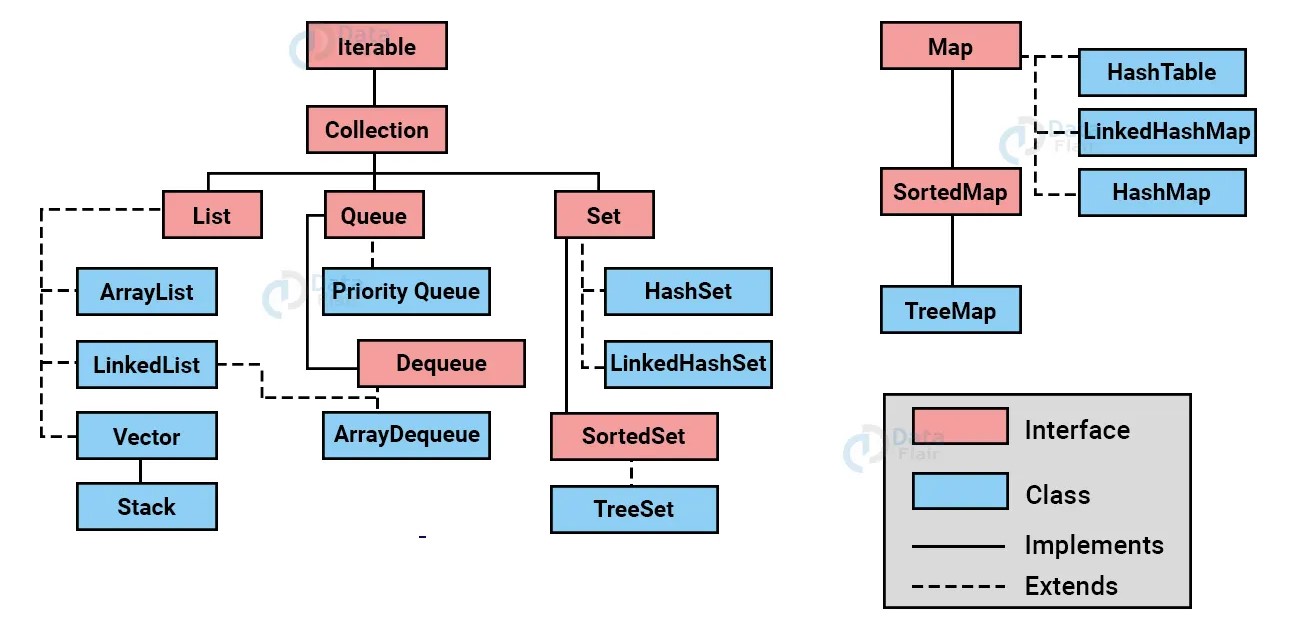
Core Interfaces in Java Collection Framework
Collection Interface
Root interface of the Java Collection Framework for List, Set, and Queue.
List Interface
Ordered collection that allows duplicate elements and maintains insertion order.
Set Interface
Collection that stores unique elements and does not allow duplicates.
LinkedHashSet maintains insertion order while keeping elements unique.
Queue Interface
Used for FIFO (First In, First Out) data structures.
Deque Interface
Double-ended queue that allows insertion and removal from both ends.
Map Interface
Stores data as key-value pairs and is not a subtype of Collection.
Core Java Collection Framework Implementations
Java Collection Framework – Frequently Asked Questions (FAQ)
What is Java Collection Framework?
Java Collection Framework is a set of interfaces and classes used to store and manipulate groups of objects in Java efficiently.
What are the main interfaces in JCF?
The main interfaces are List, Set, Queue, Deque, and Map.
What is the difference between List and Set in Java?
List allows duplicate elements and maintains order, while Set stores only unique elements.
Summary: Java Collection Framework
The Java Collection Framework is essential for every Java developer. It provides powerful data structures, consistent APIs, and built-in algorithms that make Java programming easier, faster, and more efficient.